






In today’s competitive manufacturing landscape, permanent and precise product identification is non-negotiable. Laser marking technology has emerged as the gold standard for traceability, branding, and part identification due to its permanence, high precision, and speed.
But with a crowded market of laser machines, a critical question remains: How do you select the right one for your specific products?
This guide provides a clear, step-by-step framework to help you make a confident and informed decision.
First, Understand the Basics: How Does Laser Marking Work?
Laser marking uses a focused beam of light to alter the surface of a material. The laser’s energy creates contrasts through etching, annealing, foaming, or color change, resulting in a permanent, high-quality mark. The key to selection lies in matching the laser’s wavelength to how your specific material absorbs that light.
The 5-Step Framework for Choosing Your Laser Marking Machine
Step 1: Analyze Your Material (The Most Critical Factor)
The material you’re marking is the single most important factor in your choice. Different materials absorb laser wavelengths differently.
- Metals (Stainless Steel, Aluminum, Brass, etc.): A Fiber Laser (1064nm wavelength) is typically the best choice. It offers high absorption, resulting in sharp, durable marks like engraving or annealing.
- Plastics & Polymers: The choice varies. A CO2 Laser (10.6μm) works well for many plastics, but heat-sensitive or transparent plastics may require a UV Laser (355nm) for a clean, cold mark without burning.
- Wood, Leather, Paper, and Ceramics: A CO2 Laser is highly effective, ideal for both deep engraving and surface marking.
- Glass and Crystal: A CO2 Laser is standard, but specific applications may use a Fiber laser to create a frosted effect without cracking.
- High-Reflectivity Materials (Gold, Silver, Copper): A Green Laser (532nm) is often necessary as its wavelength is more readily absorbed by reflective surfaces.
Pro Tip: If you work with a wide variety of materials, consider a hybrid system or a machine with multiple laser sources.
Step 2: Define Your Marking Requirements
Next, clarify what you need the mark to achieve in your production environment.
- Mark Permanence: Do you need a shallow surface mark for a QR code, or a deep engraving for a serial number?
- Marking Speed: What is your required throughput (parts per hour)? Higher power often translates to faster marking.
- Precision & Resolution: Do you need to mark micro-codes on medical devices or just large logos? This determines the required beam quality.
- Contrast & Color: Do you need a high-contrast black mark on stainless steel (annealing) or a specific color?
- Operating Environment: Will the machine be on a clean factory floor or in a harsh industrial setting? This affects the required enclosure and cooling system.
Step 3: Select the Laser Source Type
Based on your material and requirements, you can narrow down the laser type.
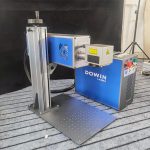
- Fiber Lasers: The workhorse for metals and some engineered plastics. They are robust, have long service lives (100,000+ hours), and require minimal maintenance.
- CO2 Lasers: The ideal solution for non-metals—wood, acrylic, glass, leather, paper, and most plastics. They are cost-effective for these applications.
- UV Lasers: A “cold” laser perfect for heat-sensitive materials. Excellent for marking plastics without melting, creating high-contrast marks on glass, and processing silicon wafers.
- Green Lasers: Specialized for highly reflective metals like gold and copper, as well as certain plastics and silicon.
Step 4: Evaluate Key Technical Specifications
Look beyond the laser type to the specific machine parameters.
- Laser Power (Watts): Ranges from 20W to 100W+. Higher power allows for faster marking and deeper engraving on tough materials.
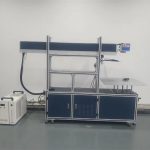
- Marking Area (Workstation Size): Choose a worktable that accommodates your largest parts.
- Cooling System: Air-cooling is sufficient for lower-power, intermittent use. Water-cooling is essential for high-power systems and continuous operation.
- Software & Connectivity: Ensure the machine’s software is user-friendly and compatible with your existing design files (e.g., AI, DXF, PLT). Look for features like barcode reading and serialization.
Step 5: Assess the Supplier and Total Cost of Ownership
You’re not just buying a machine; you’re investing in a partnership.
- Supplier Reputation: Choose an established manufacturer or distributor with proven industry experience and positive customer testimonials.
- Technical & Service Support: Do they offer comprehensive training, and is local technical support readily available? What is their average response time for repairs?
- Request a Sample Test: This is non-negotiable. A reputable supplier will always mark your actual sample parts to prove their machine’s capability.
- Total Cost of Ownership (TCO): Consider more than the initial price tag. Factor in:
- Operational Costs: Electricity, assist gases, and consumables.
- Maintenance Costs: Cost and frequency of replacing lenses, mirrors, and other consumable parts.
- ROI: Calculate the value from reduced scrap rates, less downtime, and lower labor costs compared to other marking methods.
Key Takeaways for Your Buying Journey
- Start with Your Material: Let your product dictate the laser type.
- Don’t Skip the Sample: Always test your actual parts before purchasing.
- Think Long-Term: Evaluate the supplier’s support and the machine’s TCO, not just the purchase price.
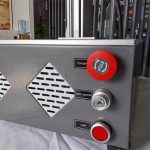
- Prioritize Safety: Verify that the equipment is fully compliant with international laser safety standards (e.g., FDA, CE) and includes proper safety enclosures and interlocks.
Conclusion
There is no single “best” laser marking machine—only the one that is “best for your application.” By systematically following this framework, you can cut through the noise and select a laser marking solution that enhances your product quality, optimizes your production line, and delivers a strong return on investment.